Native Apple-Platform Software Studio · New York, NY

East Coast Science — Native Apple-Platform Apps & Systems Tooling

We design and build high-precision native applications for macOS, iOS, and iPadOS—combining SwiftUI, Universal2 Apple Silicon & Intel binaries, local-first storage, and zero-telemetry privacy.

Featured Apps
RTTy & hyperFile
Network observability & APFS metadata
Architecture
Universal2 Gate
macOS 27 (Apple Silicon) + 26.7 (Intel)
Privacy Policy
Zero Trackers
No advertising SDKs or data brokers
Response SLA
48-Hour Response
Dedicated engineering support inbox
Live on Mac App Store
rtty.app
RTTy app icon

RTTy — Network Latency, Loss & Observability

macOS Universal2 · iOS & iPadOS Companion

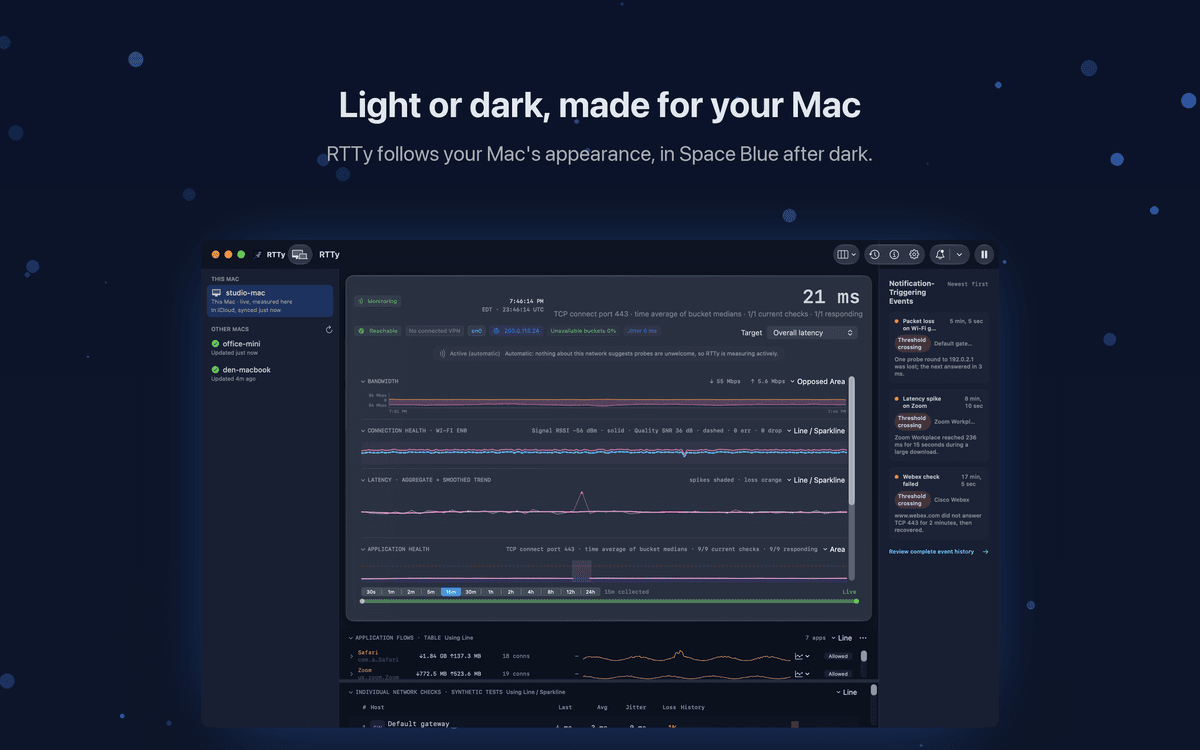
RTTy is a native Apple-platform application for inspecting current network behavior and recent measurement history. Its engine continuously measures local network targets, renders an aggregate heatmap plus rolling-average latency in the menu bar, attributes socket flows per application, and opens a comprehensive desktop dashboard.

macOS universal2 iOS & iPadOS Companion Liquid Glass UI Private iCloud Sync Zero Ads & Analytics
Software Portfolio

Applications

Native macOS, iOS, and iPadOS applications and edge services with dedicated product pages and real screenshots.

·
RTTy app icon

Network Observability · Network

App Store

Is it the Wi-Fi, the network or the app? Live connection checks, per-app traffic charts and a plain-language verdict on the Mac, with RTTy for iPhone, iPad and Apple TV.

macOSiOSiPadOStvOSSwiftUI
Open RTTy → macOS · iOS / iPadOS · tvOS
Specifications & Features Mac, iPhone & iPad v0.3.872 · Apple TV v0.3.873 · App Store
  • Router, DNS resolvers, Internet references and app services compared in one dashboard
  • Response time, jitter and packet loss, with each measurement method identified
  • Per-app upload and download from the network statistics macOS keeps, with no extension to approve
  • Verdict, latency or per-app traffic graph in the menu bar; shared timeline and CSV troubleshooting report
  • Apple TV: connection checks on the TV and read-only health snapshots from paired Macs
  • No RTTy account, no server of ours, no analytics
hyperFile app icon

Filesystem & Metadata Inspector · Systems

TestFlight · v0.19.2

Native macOS extended attribute (xattr) inspector, Quarantine & Provenance decoder, CloudKit sync state analyzer, and APFS duplicate scanner with FSEvents real-time indexing.

macOS universal2Swift CLIAPFSSpotlight
Open hyperFile → macOS 15+
Specifications & Features v0.19.2 (Build 128) · TestFlight · Developer ID
  • Structured decoding of com.apple.quarantine, com.apple.provenance, and CodeSignature blobs
  • Content-addressed SHA-256 duplicate scanning across APFS volumes and cloud storage folders
  • Real-time FSEvents filesystem monitoring with sub-second SQLite FTS5 search
  • Cloud-eviction awareness across iCloud Drive, Dropbox, Google Drive, and OneDrive
HyperCPU app icon

Hardware & Thermal Monitor · Telemetry

TestFlight · v1.1.1

Real-time CPU power, frequency, temperature, utilization, GPU activity, load averages, swap, and kernel limits in a configurable menu-bar and desktop dashboard.

macOS universal2Apple SiliconInteliOS
Open HyperCPU → macOS · iOS
Specifications & Features v1.1.1 (Build 21) · Mac, iPhone & iPad · TestFlight
  • Per-core P-core and E-core utilization, frequency, power draw, and thermal telemetry
  • GPU utilization and unified memory allocation tracking across Apple Silicon and Intel
  • System counters: open files, vnodes, load averages, and swap churn
  • Configurable Classic and 2-Column Grid dashboard layouts with menu-bar sparklines
HyperTune app icon

System Telemetry & Workbench · Systems

TestFlight · v1.1.0

Native macOS system monitoring and performance workbench with real-time inspection of CPU activity, memory pressure, kernel sysctl parameters, and network resolver guidance.

macOS universal2Apple SiliconIntel
Open HyperTune → macOS 14+
Specifications & Features v1.1.0 (Build 10) · TestFlight
  • Real-time inspection of kernel limits, sysctl keys, memory pressure, and process tables
  • Safe sandboxed tuning previews and interactive system parameter documentation
  • Network Configuration and DNS resolver latency guidance with menu-bar status
cveDB app icon

Vulnerability & Threat Intelligence · Security

App Store

Every CVE on your Mac, with CISA KEV and FIRST EPSS, searchable offline and readable by your scripts; on iPhone and iPad, look any CVE up from the official feeds.

macOSiOSiPadOSSQLiteMCP
Open cveDB → macOS · iOS / iPadOS · Web
Specifications & Features v1.2.0 · Mac, iPhone & iPad · App Store
  • Offline 4.18 GB SQLite FTS5 vulnerability database with 408,215 NVD records and 389,842 EPSS scores
  • Real-time CISA KEV catalog tracking, CVSS v3.1/v4.0 filtering, and incremental feed synchronization
  • Built-in local CLI and Model Context Protocol (MCP) agent query access alongside cvedb.dev
XEntropy app icon

Credential Inventory & Posture · Security

TestFlight · v0.4.6

Apple-first, local-first credential operations tool to discover, inventory, and track versions and rotations of API keys across dotfiles and Keychain without touching external providers.

macOS universal2KeychainCLI
Open XEntropy → macOS · iOS / iPadOS
Specifications & Features v0.4.6 (Build 25) · Mac, iPhone & iPad · TestFlight
  • Audits developer environments, shell configs, and macOS Keychain for credential posture
  • Tracks credential ages, rotations, and scope metadata without ever exposing secret values
  • Zero outbound network access: 100% local-first execution
xSite app icon

Offline Site Snapshot & Auditor · Productivity

TestFlight · v0.4.0

Deterministic website crawler, offline archive builder, Lighthouse performance auditor, and snapshot diff verifier for macOS engineers and researchers.

macOS universal2SwiftUICLI
Open xSite → macOS 15+
Specifications & Features v0.4.0 (Build 147) · TestFlight · Developer ID
  • High-concurrency polite crawler with automatic link rewriting for self-contained offline browsing
  • Complete capture of HTML, CSS, JS, fonts, images, and OpenGraph metadata
  • Built-in performance scoring and deterministic snapshot diffs for regression verification
xTokens app icon

Local LLM Token Telemetry · Telemetry

Developer ID · v0.3.3

Local-first macOS menu bar utility that scans Claude Code, Codex, and Gemini CLI session logs on disk to visualize token consumption, cache read/write ratios, and 52-week activity heatmaps.

macOS universal2Menu BarZero Network
Open xTokens → macOS 14+
Specifications & Features v0.3.3 (Build 8) · Universal2 · Developer ID
  • 100% offline JSONL transcript parser for local AI coding harnesses with zero network permissions
  • 52-week contribution-style token activity heatmap in a clean macOS MenuBarExtra popover
  • Per-project and per-model breakdown of input, output, cache creation, and cache read tokens
xReaper app icon

Process & Port Hygiene · Systems

TestFlight · v1.2.2

Orphaned process detector, runaway CPU/memory governor, and listening-port inspector for macOS developer workstations.

macOS universal2Menu BarCLI
Open xReaper → macOS 15+
Specifications & Features v1.2.2 (Build 7) · TestFlight · Developer ID
  • Identifies orphaned build daemons, wedged test runners, and stale language servers
  • Instant port-to-PID mapping and process tree ancestry inspection
  • Graceful SIGTERM-then-SIGKILL reaping with configurable safety allow-lists
ramDisk app icon

APFS Volatile Scratch Workspace · Systems

Developer ID · v1.1.0

High-speed APFS memory-backed scratch volume manager for macOS build caches, compiler artifacts, and zero-SSD-wear temporary workspaces.

macOS universal2APFS RAM DiskMCP
Open ramDisk → macOS 15+
Specifications & Features v1.1.0 (Build 108) · Universal2 · Developer ID
  • One-click creation and ejection of case-sensitive or standard APFS RAM volumes
  • Real-time throughput, IOPS, and capacity telemetry in a native desktop dashboard
  • Automatic build-cache redirection for Xcode DerivedData, SwiftPM, and Node caches
ScanRoo app icon

Document Scanner & OCR · Productivity

App Store

Turn your iPhone or iPad into a fast, private document scanner: every word becomes searchable on your device, and a PDF is ready to share.

iOSiPadOSVision OCRSwiftUI
Open ScanRoo → iOS · iPadOS
Specifications & Features v1.0.8 · iPhone & iPad · App Store
  • Document capture with Apple VisionKit, with edges found automatically
  • On-device Apple Vision OCR with structured metadata extraction
  • Export to searchable PDF, Markdown, text, HEIF, JPEG and PNG
  • Import several photos at once from Photos, or from Files
  • Favorites, tags and Recently Deleted
  • Scans and their text stay on your device unless you share or export them
In Development & Internal Preview

Coming Soon

Roadmap
FirmwareDB app icon

FirmwareDB

Apple Firmware Catalog

Apple hardware firmware catalog and Boot ROM / SEP subsystem inspector for Mac and iOS.

macOS · iOS Coming Soon
tyrell app icon

tyrell

Autonomous Systems Suite

Next-generation multi-host macOS workstation telemetry, background job orchestration, and local-first engineering control plane.

macOS 15+ Coming Soon
DataRoo app icon

DataRoo

Mac Inventory & Catalog

Comprehensive macOS system inspector and hardware catalog with duplicate detection and read-only mobile viewer.

macOS · iOS Preview →
xNamed app icon

xNamed

DNS & mDNS Inspector

Real-time DNS resolver auditor, Bonjour/mDNS service browser, and split-horizon routing verifier for macOS.

macOS 15+ Preview →
vkStats app icon

vkStats

Menu-Bar Hardware Monitor

Universal macOS system telemetry and menu-bar hardware monitor.

macOS 26+ · Universal2 Coming Soon
xDisplay app icon

xDisplay

Remote App Window Streaming

Stream one Mac app window, or the whole desktop, from a macOS host to a remote Mac, iPhone or iPad viewer.

macOS · iOS / iPadOS Coming Soon
xPixel app icon

xPixel

Pixel Display Controller

Drive small networked pixel displays (Tidbyt, Tronbyt and ESP32 HUB75 matrices) from one macOS and iOS app and the xpixel CLI, with no cloud.

macOS · iOS · CLI Coming Soon
modelsDB app icon

modelsDB

Local AI Model Catalog

Discover, inspect and manage the local AI model weights on your Mac (Ollama, Hugging Face, LM Studio), with memory estimates; it never downloads models or runs inference.

macOS 26+ Coming Soon
dishTTY app icon

dishTTY

Starlink Terminal Monitor

Shows a Starlink user terminal’s live link (latency, throughput, obstruction, outages and alignment) from the menu bar and a dashboard.

macOS 26+ · Universal2 Coming Soon
xDarwin app icon

xDarwin

macOS Admin Toolkit

A suite of small macOS tools for developers and admins (TCC, launchd and login-item remnants, app remnants, iCloud repair, permissions), dry-run by default.

macOS 26+ · Universal2 Coming Soon
About East Coast Science

About & Engineering Standards

Independent New York software studio building native Apple-platform applications and developer infrastructure.

Developer ID: east coast science, llc (ZU2882L4HT)

East Coast Science, LLC is an independent software and systems engineering company based in New York, NY. We build native macOS, iOS, and iPadOS applications alongside high-availability edge services—focusing on network observability, filesystem telemetry, on-device document intelligence, and developer workflow automation.

Every native application we ship is written in Swift and SwiftUI, compiled as a Universal2 binary supporting both Apple Silicon (arm64) and Intel (x86_64) Macs, signed with our Apple Developer ID (ZU2882L4HT), and notarized by Apple.

ecs.config.yaml
production · 2026.11
# East Coast Science LLC Operational Profile
entity:        East Coast Science, LLC
developer_id:  ZU2882L4HT (east coast science, llc)
domain:        eastcoastscience.com (canonical)
support_email: support@eastcoastscience.com
platforms:     [macOS 27.0, macOS 26.7 (Intel), iOS 18+, iPadOS 18+, Cloudflare Edge]
build_gate:    universal2 (arm64 + x86_64) · Developer ID signed & notarized
privacy:       zero third-party tracking · no ads · local-first iCloud sync

Universal2 Binary Gate

Universal2 is a mandatory build gate across all East Coast Science macOS applications. Every app builds dual slices for arm64 (Apple Silicon, targeting macOS 27.0) and x86_64 (Intel, targeting macOS 26.7). The release pipeline verifies lipo -archs before packaging.

Developer ID Application Signing

All production binaries are signed with the company Developer ID certificate (Developer ID Application: east coast science, llc (ZU2882L4HT)), built with Apple Hardened Runtime, cryptographically timestamped, and stapled after automated Apple notarytool notarization.

Local-First & Private iCloud

Application data resides locally in the user's secure application container. Cross-device synchronization operates strictly through the user's personal, end-to-end encrypted iCloud account. No East Coast Science server retains, inspects, or has access to customer measurement or document data.

Privacy Covenant

East Coast Science applications contain zero advertising SDKs, zero user-tracking frameworks, and zero third-party telemetry. Diagnostic logging is strictly opted-in and sanitized. We do not sell or monetize personal data under any circumstances.

System Topology

Architecture & Tier Model

High-level architectural blueprint across client, local engine, and edge tiers.

╭────────────────────────────────────────────────────────────────────────╮
│                         TIER 1: APPLE CLIENT LAYER                     │
│                                                                        │
│   ┌───────────────────────────┐      ┌─────────────────────────────┐   │
│   │   RTTy (macOS 27/26)      │      │  hyperFile & HyperCPU (Mac) │   │
│   │   SwiftUI · Liquid Glass  │      │  APFS metadata & thermals   │   │
│   └─────────────┬─────────────┘      └──────────────┬──────────────┘   │
│                 │                                   │                  │
│                 ▼                                   ▼                  │
│   ┌───────────────────────────┐      ┌─────────────────────────────┐   │
│   │  ScanRoo · iPhone & iPad  │      │  iOS / iPadOS Companions    │   │
│   │  On-device Vision OCR     │      │  Private iCloud Containers  │   │
│   └───────────────────────────┘      └─────────────────────────────┘   │
╰──────────────────────────────────────┬─────────────────────────────────╯
                                       │ Local Inter-Process / SQLite WAL
                                       ▼
╭────────────────────────────────────────────────────────────────────────╮
│                  TIER 2: LOCAL ENGINES & DEVELOPER CLI                 │
│                                                                        │
│   ┌───────────────────────────┐      ┌─────────────────────────────┐   │
│   │  ramDisk & XEntropy       │      │  xSite, xNamed & xReaper    │   │
│   │  Local cache & Keychain   │◄────►│  Crawling, DNS & process    │   │
│   └───────────────────────────┘      └─────────────────────────────┘   │
╰──────────────────────────────────────┬─────────────────────────────────╯
                                       │ HTTPS / Edge CDN / REST
                                       ▼
╭────────────────────────────────────────────────────────────────────────╮
│                     TIER 3: CLOUDFLARE EDGE NETWORK                    │
│                                                                        │
│   ┌───────────────────────────┐      ┌─────────────────────────────┐   │
│   │  rtty.app                 │      │  cvedb.dev                  │   │
│   │  RTTy web & support     │      │  Security tracker archive   │   │
│   └───────────────────────────┘      └─────────────────────────────┘   │
│   ┌────────────────────────────────────────────────────────────────┐   │
│   │  eastcoastscience.com (Bare Apex Canonical)                    │   │
│   │  Cloudflare Pages Static Portal & Documentation                │   │
│   └────────────────────────────────────────────────────────────────┘   │
╰────────────────────────────────────────────────────────────────────────╯
Contact & Assistance

Contact East Coast Science

Direct engineering support, product inquiries, and customer assistance for all East Coast Science applications.

Email Support
support@eastcoastscience.com
48-hour SLA response guarantee
Telephone
646-355-8705
Monday–Friday, 9:00 AM – 6:00 PM ET

Reporting Defects & Feedback

Submit bug reports or feature requests directly to support@eastcoastscience.com or call 646-355-8705. Every message is triaged by an engineer within 48 hours.

bug-report.template support@eastcoastscience.com
To: support@eastcoastscience.com
Subject: [Bug] App Name - Brief Summary
Platform: macOS 27.0 / macOS 26.7 / iOS 18
Version: Build Number & Architecture
Steps: 1. Launch  2. Action  3. Expected vs Actual